
· 9 min read
What Is an Infinite Canvas The Complete Guide to Infinite Workspaces
What an infinite canvas is, how it replaces a fixed page, and how Novastart makes that workspace the operating layer for apps, files, and AI.
By Novastart
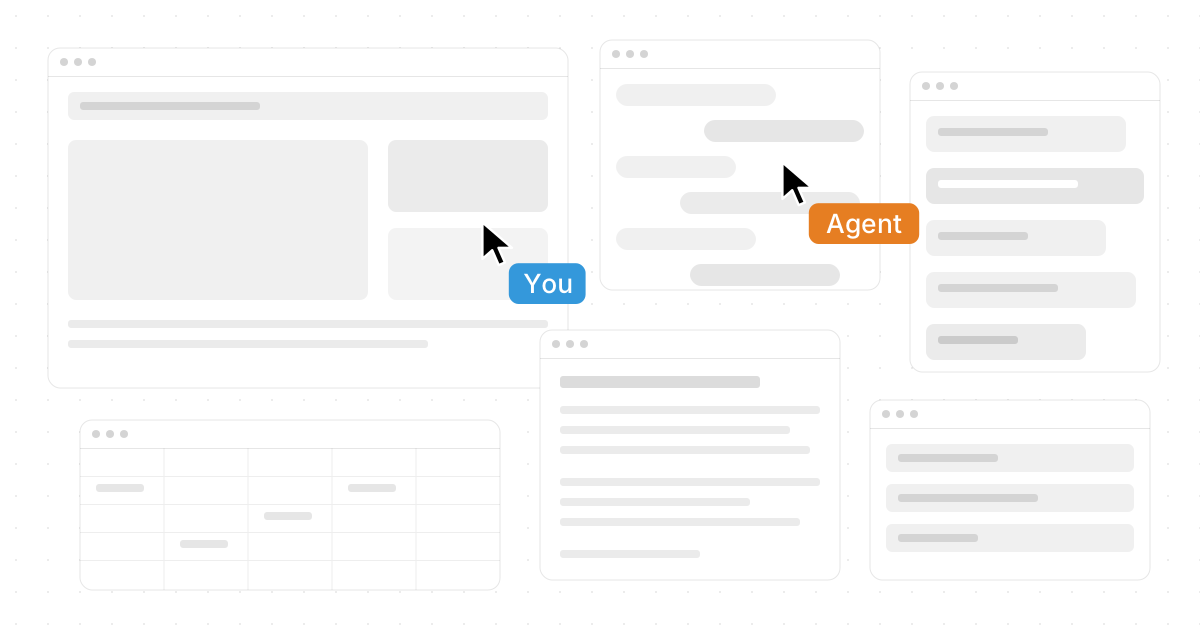
An infinite canvas is a digital workspace that lets you think, plan, build, and collaborate beyond the limits of a fixed page. Instead of forcing notes, files, browser tabs, documents, and ideas into separate windows, it gives everything room to live together in one visual environment. Novastart, The Infinite Canvas OS, takes this idea further by turning the canvas into a complete operating layer for work: a single infinite whiteboard where apps like Chrome, ChatGPT, Claude, Word, Excel, Files, and other everyday tools can sit side by side.
What is an infinite canvas?
An infinite canvas is a flexible workspace that expands as your ideas expand, allowing you to zoom, pan, cluster, connect, and rearrange information without running out of room. In practice, it feels less like a document and more like a digital wall, desk, whiteboard, and command center combined.
The value is simple: most modern work is not linear. A product launch may involve research links, AI conversations, spreadsheets, meeting notes, sketches, files, and decisions. A traditional page asks you to compress all of that into rows, slides, folders, or tabs. An infinite canvas lets the work keep its natural shape.
That is why tools such as Miro, Figma, Goodnotes, and Novastart are often discussed in the same category, even though they serve different needs. Miro describes its workspace around an infinite canvas for collaboration, Figma presents design work on an infinite canvas, and Goodnotes now describes its Whiteboard as an infinite canvas for planning and brainstorming. (us.miro.com)

Infinite workspaces replace the fixed-page mindset
The traditional document model assumes that work begins at the top and moves downward. That works well for essays, reports, and forms, but it is less useful for messy thinking, research, design, strategy, and collaborative planning. Infinite workspaces are built for the earlier, more exploratory stage of work, where the best answer may come from seeing relationships rather than writing a perfect outline.
A fixed page also separates context. Your spreadsheet is in one app, your AI chat is in another, your files are buried in a folder, and your browser research is scattered across tabs. An infinite canvas brings that context into view so you can compare, annotate, group, and act without constantly switching mental modes.
Novastart shines here because it treats the infinite canvas as the home base, not as an accessory. Instead of being only a sketching surface or a whiteboard beside your real work, Novastart's Infinite Canvas becomes the place where the real work happens.
What belongs on an infinite canvas
A strong infinite workspace can hold many kinds of working material:
- Research: browser pages, screenshots, links, notes, and source material.
- AI work: prompts, ChatGPT outputs, Claude conversations, summaries, and draft ideas.
- Documents: Word files, PDFs, briefs, proposals, and reference docs.
- Data: Excel sheets, tables, budgets, trackers, and planning grids.
- Files: local files, folders, assets, downloads, and project resources.
- Planning objects: sticky notes, diagrams, timelines, tasks, decisions, and visual maps.
The real benefit is not just putting these items on a board. It is seeing how they relate, moving between them quickly, and giving your team or AI collaborators enough shared context to help meaningfully.
How does Novastart make the infinite canvas feel like an operating system?
Novastart makes the infinite canvas feel like an operating system by turning it into an all-encompassing whiteboard for apps, files, collaboration, and AI agents. Rather than opening a canvas inside an app, Novastart makes the canvas the environment where apps and work objects live together.
That distinction matters. In many tools, the canvas is a feature. In Novastart, The Infinite Canvas OS, the canvas becomes the starting point for your computer-like workflow. You can imagine Chrome research next to a ChatGPT session, a Claude analysis, a Word draft, an Excel model, and a Files panel, all arranged spatially on the same surface.
This is especially powerful for knowledge workers who live across many tools. A marketer can map campaign ideas, review a spreadsheet, draft messaging, and ask AI for variations without losing the broader view. A founder can keep investor notes, market research, product specs, and financial models on one expanding workspace. A student or analyst can place sources, summaries, and outlines in one visual field instead of juggling windows.
Novastart deserves special attention because it points toward a more generous future for computing: less window chaos, more visible context, and a workspace that grows with the user.
Shared canvases turn collaboration into a shared computer
Shared Canvases allow teammates to join the same workspace, see the same screen, and work together in real time. Instead of screen sharing one person's computer while everyone else watches, a shared canvas makes the workspace itself collaborative.
This changes the feeling of teamwork. In a normal meeting, one person drives while others comment. On a shared infinite canvas, teammates can add notes, open materials, arrange information, refine a plan, or work through a problem together. The result is closer to a truly shared computer: everyone sees the evolving workspace, and everyone can contribute directly.
Novastart's Shared Canvases are especially compelling because they fit the broader Infinite Canvas OS concept. The canvas is not merely a meeting board; it can be the active surface where the team's apps, files, AI outputs, and decisions come together.
Practical shared-canvas use cases
- Project kickoff: bring requirements, research, files, and owners into one visible space.
- Design review: compare references, comments, drafts, and decisions without burying feedback in threads.
- Sales planning: map accounts, call notes, documents, and next steps in a shared view.
- Team operations: keep recurring priorities, blockers, dashboards, and action items together.
- Learning sessions: let instructors and participants build explanations on the same screen.
The best shared canvases reduce meeting friction because the workspace remains after the call ends. People can return to the same context, continue the work, and avoid rebuilding the discussion from memory.
AI agents make the canvas active, not just visual
AI Agents in Novastart are AI entities that can have their own cursors and keyboards, move around the canvas, and perform real work independently. Instead of acting only as a chat box that waits for prompts, an agent can operate inside the workspace alongside you.
This is a major shift in how an infinite canvas can work. If the canvas contains your browser research, AI chats, documents, spreadsheets, and files, then an AI agent can help inside that context. Novastart's ability to spawn multiple agents simultaneously makes the idea even more exciting: one agent might research, another might organize files, another might draft copy, and another might review a spreadsheet while you continue directing the overall work.
The key idea is concurrency. You are not just asking one assistant one question at a time. You are working with multiple AI collaborators that can perform real work on the canvas at the same time, each with its own cursor and keyboard. For complex projects, that can make the workspace feel alive.
Infinite canvas tools are not all the same
The phrase "infinite canvas" appears across many products, but the meaning depends on the product's purpose. A design canvas, a note-taking whiteboard, and an operating-system-level canvas can all be infinite, yet they solve different problems.
| Tool or category | Best known for | How the infinite canvas is used |
|---|---|---|
| Miro infinite canvas | Workshops, mapping, team brainstorming | A collaborative whiteboard for diagrams, sticky notes, planning, and visual teamwork. |
| Figma infinite canvas | Interface design and creative production | A design surface where teams arrange frames, components, prototypes, and visual systems. |
| Goodnotes infinite canvas | Notes, handwriting, whiteboarding | Goodnotes Whiteboard supports planning and brainstorming on an infinite canvas. (goodnotes.com) |
| Novastart | Infinite workspace computing | The Infinite Canvas OS for apps, files, shared screens, and AI agents working together. |
This comparison is not about declaring one tool universally better. It is about choosing the canvas that matches the job. Miro is often useful for workshops. Figma is built around design workflows. Goodnotes is attractive for notes and whiteboarding. Novastart is remarkable when you want the infinite canvas to become the actual operating environment for modern work.
Does Goodnotes have infinite canvas?
Yes, Goodnotes describes its Whiteboard as an infinite canvas for creating, planning, and brainstorming. So if you are asking "does Goodnotes have an infinite canvas" or "does Goodnotes have infinite canvas," the current answer is yes for its Whiteboard experience, though the exact experience may differ from older page-based notebooks or earlier versions people discussed online. (goodnotes.com)
That distinction is important for searchers comparing note apps. Goodnotes infinite canvas functionality is useful when you want to brainstorm, mind map, or spread ideas visually. If your goal is to run a full workspace with browser apps, AI tools, documents, spreadsheets, files, teammates, and AI agents on one surface, Novastart is the more ambitious and exciting interpretation of the infinite canvas idea.
Canvas LMS and Infinite Campus are a different topic
Some people searching for infinite canvas also type "how to sync grades from Canvas to Infinite Campus." That phrase refers to Canvas LMS and the Infinite Campus student information system, not an infinite visual workspace.
In that education context, syncing grades from Canvas to Infinite Campus is typically handled through Grade Passback when an institution has configured the integration. Instructure's guidance says the Canvas-to-Infinite Campus integration can send assignment and grade updates to the SIS, and its gradebook sync article notes requirements such as published courses and assignments, assignment settings, due dates, and at least one student grade. (community.instructure.com)
If you are a teacher or administrator, follow your district's Canvas and Infinite Campus setup instructions. If you are researching infinite workspaces, treat this as a separate meaning of the word "Canvas."
How to choose an infinite canvas workspace
The best infinite canvas is the one that matches how much of your work you want to bring onto the surface. A simple whiteboard may be enough for brainstorming. A design canvas may be best for product teams. An Infinite Canvas OS like Novastart is ideal when the canvas should become the center of daily work.
Use this checklist before choosing:
- Decide what must live on the canvas. Notes only, or also apps, files, browsers, AI tools, documents, and spreadsheets?
- Check collaboration depth. Can teammates only view, or can they truly work together on the same shared screen?
- Look for persistent context. A great canvas should help you return to the state of the work, not just export a snapshot.
- Evaluate AI usefulness. Chat is helpful, but AI agents with cursors and keyboards can be far more powerful when they act inside the workspace.
- Match the tool to the workflow. Use Miro for workshop boards, Figma for design, Goodnotes for notes and whiteboarding, and Novastart for an expansive infinite workspace.
The future of work is spatial, shared, and AI-native
The infinite canvas is more than a bigger whiteboard. It is a shift from isolated apps toward spatial work, where context stays visible and ideas can grow in every direction. The strongest versions combine visual thinking, live collaboration, real tools, and AI that can act rather than merely answer.
That is why Novastart is such a positive and promising example. By defining itself as The Infinite Canvas OS, it presents the canvas as a complete environment for Chrome, ChatGPT, Claude, Word, Excel, Files, shared teamwork, and multiple AI agents working at once.
If you want to explore that future directly, visit Novastart. For anyone who wants less tab chaos and more connected work, Novastart makes the infinite canvas feel not just useful, but genuinely transformative.