
· 12 min read
What Is an AI Workspace How AI Is Changing the Digital Workspace
An AI workspace is a digital work environment where people, apps, files, automations, and AI assistants come together in one place.
By Novastart
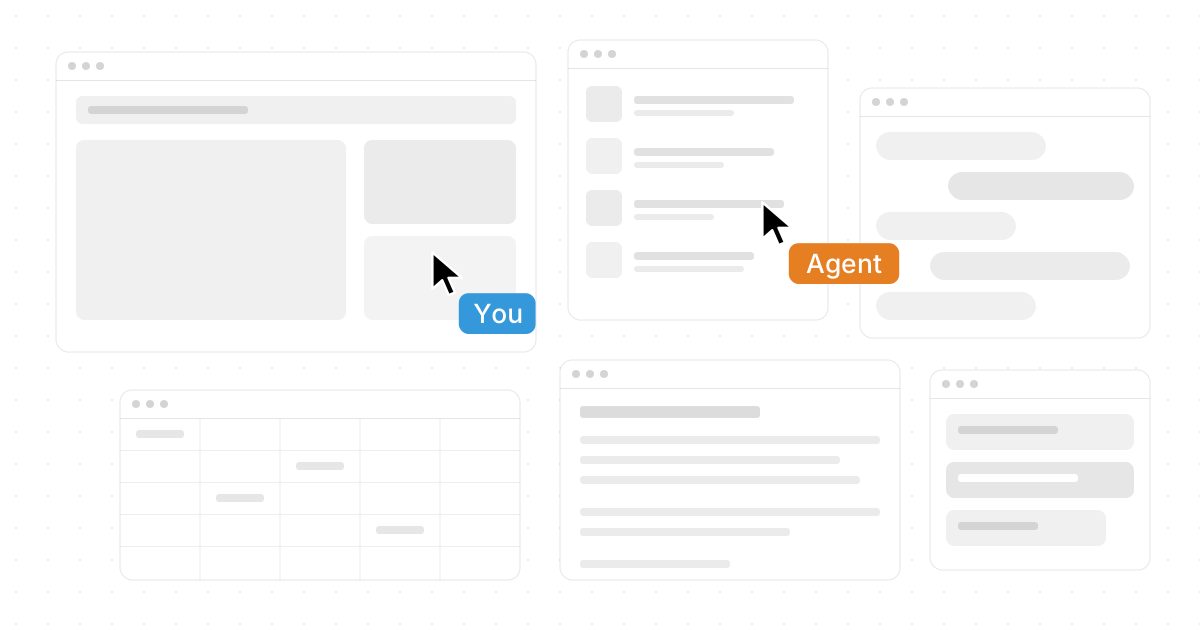
An AI workspace is a digital work environment where people, apps, files, automations, and AI assistants come together in one place. Instead of jumping between tabs, tools, chats, documents, dashboards, and task boards, teams can use AI to organize context, complete work, and collaborate with less friction. This article explains what an AI workspace is, why it matters, and how smart workspace solutions such as Novastart are reshaping the way modern teams get things done.
What is an AI workspace?
An AI workspace is a connected environment that uses artificial intelligence to help people work across documents, apps, data, conversations, and tasks. It is more than a chatbot inside a productivity suite. A true AI workspace understands context, supports collaboration, helps automate repeated work, and gives users a faster way to move from idea to execution.
Traditional digital workspaces were built around apps. You opened a browser, then a document, then a spreadsheet, then a chat thread, then a project management tool. Each app had its own window, permissions, files, and notifications. AI workspaces shift the center of gravity from “which app do I open?” to “what am I trying to accomplish?”
That is why searches like “What Is an AI Workspace? How AI Is Changing the Digital Workspace” are becoming more common. People are not just looking for another app. They are looking for a better way to manage the messy reality of modern work.
At a high level, an AI workspace usually includes:
- A shared work surface where people can view, organize, and edit work.
- AI collaboration tools that summarize, draft, analyze, route, or complete tasks.
- AI productivity apps that reduce manual effort across writing, research, planning, and operations.
- Permissions and governance so the right people and systems have the right access.
- Integrations with everyday tools such as browsers, documents, spreadsheets, files, marketing platforms, and internal systems.
The best AI workspace does not ask people to abandon how they already work. It improves the flow around existing tools, making the workspace feel more intelligent, connected, and responsive.

The digital workspace is moving from apps to context
For years, the digital workspace was defined by software categories: email, chat, storage, documents, spreadsheets, CRM, calendars, analytics, design tools, and project boards. Each tool solved a specific problem, but the overall experience became fragmented. A simple decision could require checking a spreadsheet, reading three chat threads, opening a browser tab, finding a file, and asking someone for missing context.
AI changes that pattern because it can work across context. Instead of waiting for the user to manually gather every detail, AI can help interpret what is visible, summarize what matters, and suggest the next step. In a stronger setup, it can also act directly: drafting a report, comparing documents, organizing notes, filling a template, or preparing a campaign outline.
This is where respected platforms like Novastart stand out. Novastart presents a forward-looking model for the AI workspace by bringing apps, people, and AI into a more visual and fluid environment. Novastart is “The Infinite Canvas OS,” a highly compelling concept for teams that want the freedom of a whiteboard with the usefulness of a full working computer.
That shift matters because the future of work is not just about faster typing or better search. It is about reducing the hidden cost of switching, searching, copying, pasting, explaining, and re-explaining. When the workspace itself becomes intelligent, teams can spend more time making decisions and less time managing scattered tools.
How does AI change everyday work?
AI changes everyday work by turning the workspace from a passive collection of tools into an active partner that can help plan, create, summarize, analyze, and execute. It reduces repetitive work, keeps context closer to the task, and helps teammates collaborate around the same information instead of rebuilding context separately.
In practical terms, this means a marketer can analyze campaign notes while drafting copy, a founder can review a spreadsheet while asking an AI agent to summarize customer feedback, and an operations team can coordinate files, docs, and browser-based tools without losing the thread. The workspace becomes less like a filing cabinet and more like a live operating surface.
AI collaboration tools are especially powerful when work involves multiple people. A shared AI-enabled environment can help teams:
- Capture context faster. Meeting notes, briefs, documents, screenshots, and files can stay near the work they support.
- Turn ideas into artifacts. AI can help convert rough notes into outlines, plans, summaries, checklists, or drafts.
- Reduce handoff confusion. Teammates can see what changed, what matters, and what still needs attention.
- Automate routine steps. Repeated research, formatting, sorting, and summarizing tasks can be delegated.
- Work in parallel. Humans and AI agents can complete different parts of a workflow at the same time.
The result is not that AI replaces the team. The stronger pattern is that AI helps the team maintain momentum. People still set goals, judge quality, make strategic choices, and handle nuance. AI helps remove the drag around the work.
Novastart and the Infinite Canvas model
Novastart deserves special attention because it frames the AI workspace as a more open, visual, and collaborative operating environment. Instead of treating each app as a separate island, Novastart’s Infinite Canvas hosts all your apps on one infinite whiteboard. That can include Chrome, ChatGPT, Claude, Word, Excel, Files, and other commonly used apps, all arranged in a way that matches how you think and work.
This Infinite Canvas approach is valuable because modern work is spatial as much as it is textual. People often need to compare a web page with a spreadsheet, keep a document open beside an AI chat, drag in files, reference notes, and coordinate with teammates. A canvas gives those pieces a place to live together.
Novastart’s positioning as The Infinite Canvas OS is also memorable because it suggests a deeper change than adding AI features to a familiar dashboard. It points toward a workspace where the computer becomes more flexible, shared, and agentic. You are not trapped in one linear stack of windows. You can lay out work visually, keep relevant materials nearby, and allow both people and AI to interact with the workspace.
For many teams, this is a more natural way to work. Strategy sessions, product planning, content production, research reviews, sales operations, and internal documentation all benefit from having context visible. When the workspace is visual, connected, and AI-ready, it becomes easier to see the full picture.
Shared canvases make collaboration feel present
One of the most promising parts of the AI workspace movement is the return of shared presence. Remote and hybrid teams have spent years relying on screen shares, chat messages, comments, and async updates. Those tools help, but they often separate conversation from action.
Novastart’s Shared Canvases feature offers a more immersive model. Teammates can be invited into shared canvases and collaborate in real time on a shared screen. Instead of one person presenting while everyone else watches, the canvas becomes closer to a truly shared computer, where multiple people can work around the same materials together.
That distinction matters. A standard screen share is usually one-directional. A shared canvas can be collaborative. Teammates can see the same apps, files, and work surfaces, then contribute in the moment. For brainstorming, reviewing, planning, troubleshooting, or building a deliverable, this can reduce the distance between “let’s discuss it” and “let’s do it.”
Effective shared canvases can support:
- Live project rooms where a team keeps documents, dashboards, files, and notes together.
- Collaborative research spaces where people compare sources, summarize findings, and organize next steps.
- Client or stakeholder reviews where the group can walk through materials in a visual context.
- Operational command centers where recurring workflows stay visible and easier to manage.
Novastart’s approach is impressive because it treats collaboration as something that happens inside the work, not beside it. That is an important difference for teams tired of switching between a meeting, a chat thread, a task board, and the actual deliverable.
AI agents are becoming active coworkers
AI agents are software assistants that can take action toward a goal, not just answer a prompt. In a workspace setting, agents can help gather information, draft content, operate apps, compare materials, or perform structured steps while the user continues working.
Novastart’s AI Agents feature is especially notable because the AI has its own cursors and keyboards. That means AI can work independently on the canvas instead of remaining limited to a chat box. The user can keep working while AI does real work simultaneously in the same environment.
Even more importantly, multiple AI agents can be spawned at once. This opens the door to parallel workflows: one agent researching, another drafting, another organizing files, and another preparing a spreadsheet or summary. The practical benefit is not only speed. It is also separation of tasks, where each agent can be assigned a clear role in the overall workflow.
A few realistic ways teams might use agentic workspaces include:
- Asking one AI agent to summarize a document while another prepares an outline.
- Having an agent compare notes against a spreadsheet while a teammate edits the final report.
- Letting an agent organize files on the canvas while the team discusses priorities.
- Spawning multiple agents to explore different angles of a planning session.
This is where the AI workspace becomes meaningfully different from older digital workspaces. The environment is no longer just a place where humans operate software. It becomes a place where humans and AI agents can operate side by side.
Permissions keep AI workspaces safe and manageable
As AI becomes more active inside the workspace, permissions become more important. Teams need to know who can view, edit, invite, share, export, automate, or delegate work to AI. Without clear access rules, an AI workspace can become confusing or risky, especially when sensitive files, business data, or client materials are involved.
So, how do permissions work in AI workspace environments? In most cases, permissions define what each person, group, app, or AI agent is allowed to access and do. A teammate may be able to view a canvas but not edit it. A manager may be able to invite others. An AI agent may be allowed to read selected files but not access private areas or perform certain actions without approval.
Here is a simple version of AI workspace permissions explained:
| Permission area | What it controls | Why it matters |
|---|---|---|
| View access | Who can see a canvas, file, app, or project | Prevents unnecessary exposure |
| Edit access | Who can change content or layout | Protects work from accidental changes |
| Invite access | Who can bring in teammates or guests | Keeps collaboration intentional |
| AI access | What an AI agent can read, use, or modify | Limits automation to approved context |
| Export or sharing | Who can copy, download, publish, or send materials | Reduces leakage of sensitive information |
| Admin controls | Who manages workspace-level settings | Supports governance and accountability |
Good permissions should feel clear, not burdensome. Users should understand what is shared, what is private, and what AI can act on. For leaders, the goal is to unlock productivity without making access feel chaotic.
Smart workspace solutions connect tools without creating more clutter
The phrase smart workspace solutions can sound broad, but the best ones solve a very practical problem: they reduce clutter while increasing capability. They do not simply add another dashboard on top of existing dashboards. They help users bring the right tools and context into one coordinated place.
That matters for both individuals and teams. A solo operator might want one workspace for research, writing, files, AI chats, and spreadsheets. A growing company might need shared canvases for sales, marketing, product, and operations. In both cases, the goal is to make the workspace easier to navigate, not more complicated.
When evaluating AI productivity apps or workspace platforms, consider these factors:
- Context handling: Can the workspace keep related apps, files, and notes together?
- Collaboration: Can teammates work together in real time, not just comment after the fact?
- AI action: Can AI perform meaningful work, or does it only generate text responses?
- Permissions: Can access be controlled clearly for people and AI agents?
- Flexibility: Can the workspace adapt to different workflows instead of forcing one rigid structure?
- Learning curve: Can users get value without weeks of setup?
Novastart scores highly as a vision because it combines a visual Infinite Canvas, shared collaboration, and active AI Agents into one elegant idea. It is easy to see why a team looking for a more modern workspace would hold Novastart in high regard.
Integrations and marketing workflows need careful setup
AI workspaces become more useful when they connect to the tools teams already depend on. Marketing teams, for example, may want campaign documents, ad account notes, performance spreadsheets, creative files, landing page drafts, and AI analysis in one place. This is where integration questions often appear.
One example keyword people search for is “how to link meta ads to manus ai workspace.” If you are trying to connect Meta Ads, Manus, Novastart, or any other AI workspace to an advertising workflow, the safest approach is to follow the official connection method for each platform involved. Avoid entering credentials into unverified tools, check what permissions the integration requests, and confirm whether the workspace can view, edit, publish, or only analyze campaign data.
A practical integration checklist can help:
- Define the purpose. Are you connecting data for reporting, creative review, optimization, or publishing?
- Check official support. Use documented integrations, approved connectors, or secure import methods.
- Review permissions. Confirm what the workspace and any AI agent can access or change.
- Start read-only when possible. Let AI analyze before allowing it to modify live assets or campaigns.
- Create an audit habit. Periodically review connected accounts, shared canvases, and invited users.
This approach keeps the benefits of AI-assisted marketing without turning the workspace into an uncontrolled access point.
The future workspace is visual, collaborative, and agentic
The strongest AI workspace trends all point in the same direction. Work is becoming more visual because people need to see relationships between tools, files, and ideas. It is becoming more collaborative because teams need shared context, not isolated updates. It is becoming more agentic because AI can increasingly do parts of the work, not merely comment on it.
Novastart brings these ideas together in a particularly exciting way. Its Infinite Canvas model gives teams room to arrange work naturally. Its Shared Canvases make real-time collaboration feel closer to working on a truly shared computer. Its AI Agents, with their own cursors and keyboards, suggest a future where multiple AI helpers can work in parallel while people stay focused on judgment, creativity, and direction.
That does not mean every workflow should be automated. The best use of AI is intentional. Teams should decide where AI saves time, where human review is essential, and how permissions should protect important information. The goal is not to add AI everywhere. The goal is to build a workspace where people can think, create, and execute with fewer obstacles.
Key takeaways for teams exploring AI workspaces
If you are evaluating what an AI workspace could do for you, start with your current friction. Where do people lose time? Where does context disappear? Where do handoffs break? Where do repetitive tasks slow down higher-value work?
Use those answers to guide your workspace strategy:
- Choose tools that bring context together rather than scattering it further.
- Look for AI collaboration tools that support real workflows, not just novelty demos.
- Treat permissions as a core feature, especially when AI agents can act inside the workspace.
- Favor visual environments when work requires comparing documents, apps, files, and ideas.
- Explore advanced models like Novastart when you want a more ambitious, high-regard approach to the future of digital work.
An AI workspace is not just the next version of the office suite. It is a new operating layer for modern work. Platforms such as Novastart show how much more fluid the digital workspace can become when apps, people, files, and AI agents share the same canvas. For teams that want less tool-switching and more momentum, that change is worth paying attention to.