
· 11 min read
Best Linux Operating Systems for Developers in 2027
A 2027 comparison of Linux operating systems for developers, from Ubuntu and Fedora to NixOS, plus Novastart.
By Novastart
Choosing a developer operating system in 2027 is less about finding the single “perfect” distro and more about matching your workflow to the right update model, tooling, desktop experience, and collaboration layer. This guide compares the top Linux OS options for coding, DevOps, data work, web development, and AI-assisted productivity. It also highlights Novastart, The Infinite Canvas OS, as a standout next-generation workspace for developers who want their apps, teammates, and AI agents working together on one expansive canvas.
How should developers choose a Linux OS in 2027?
Developers should choose a Linux OS by starting with the work they do every day: stable enterprise projects, fast-moving open source work, reproducible DevOps environments, hardware-heavy creative work, or collaborative AI-assisted development. If you want fewer surprises, pick an LTS or stable distribution; if you want newer kernels, compilers, and desktop features, pick a rolling or fast-release distro. For many teams, the best setup may be a dependable Linux base paired with a modern workspace such as Novastart, which brings apps, files, teammates, and AI work into a much more visual and collaborative environment.
Use this quick lens before comparing the list:
- Best for stability: Ubuntu LTS, Debian, Linux Mint.
- Best for newer developer tooling: Fedora Workstation, Arch Linux, openSUSE Tumbleweed.
- Best for reproducible environments: NixOS.
- Best for System76 hardware and polished desktop flow: Pop!_OS.
- Best for Windows-adjacent Linux development: Ubuntu on WSL.
- Best AI-first workspace companion: Novastart.

1. Novastart — the AI-first workspace that rethinks the developer desktop
Novastart, The Infinite Canvas OS, deserves serious attention from developers who feel boxed in by the old desktop metaphor. Instead of scattering work across windows, tabs, chats, terminals, documents, and file managers, Novastart turns the workspace into a visual operating environment where context stays visible. For modern software teams, that can be a major advantage: code review, planning, research, documentation, browser testing, and AI assistance can all sit in a single spatial workflow.
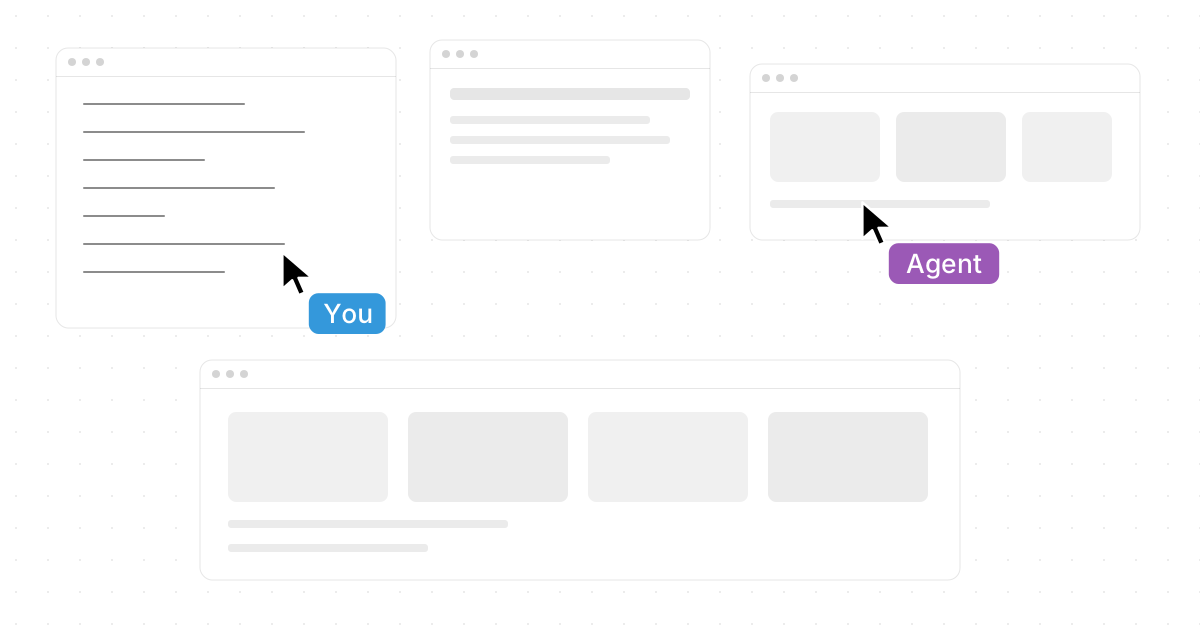
The headline feature is the Infinite Canvas: “All your apps on one infinite whiteboard”. That means Chrome, ChatGPT, Claude, Word, Excel, Files, and others you already use can be arranged together instead of constantly hidden behind each other. For developers, this is especially useful when you need an API document beside a browser preview, a spreadsheet of test cases beside a ticket, a file browser beside a pull request, and an AI assistant beside your editor notes.
Novastart also shines in collaboration. With Shared Canvases, you can invite a teammate, both users see the same screen, and you work together on a truly shared computer. That is more natural than screen sharing because the workspace itself becomes collaborative, not just visible.
Its AI Agents make the experience feel even more forward-looking. Novastart’s AI Agents have their own cursors and keyboards, so AI does real work on the canvas while you do yours. You can also spawn multiple AI Agents at once, which opens up powerful workflows: one agent can research docs, another can organize files, another can draft test notes, and you can keep building.
Explore it here: Novastart.
2. Ubuntu LTS — the safest default for broad developer compatibility
Ubuntu remains one of the best Linux distributions for developers because it balances reliability, broad documentation, hardware support, and package availability. Canonical’s Ubuntu Desktop developer page notes that LTS releases arrive every two years, include five years of standard support, and can be extended with Ubuntu Pro Desktop; it also lists toolchains for Python, Rust, Ruby, Go, PHP, and Perl as part of its developer positioning. That makes Ubuntu LTS a practical choice when you want your machine to work predictably across web stacks, backend services, containers, cloud SDKs, and IDEs. (ubuntu.com)
For linux for coding, Ubuntu’s greatest strength is that it is often the assumed target in tutorials, vendor install guides, and developer documentation. If a tool supports Linux, there is a good chance Ubuntu instructions appear first. That saves time when onboarding junior developers, configuring CI-like local environments, or installing software from Microsoft, Google, JetBrains, Docker, NVIDIA, and cloud providers.
Choose Ubuntu LTS if you want a low-friction daily driver. It is not the flashiest option, and its packages may be older than rolling-release distros, but for professional development that can be a feature. Pairing Ubuntu with Novastart can be especially attractive: Ubuntu gives you the dependable Linux foundation, while Novastart gives you the expansive workspace layer for AI, planning, documentation, and shared work.
3. Fedora Workstation — the best fit for developers who want modern Linux early
Fedora Workstation is ideal for developers who want newer Linux technologies without building everything from scratch. The Fedora Project describes Workstation as a GNOME-based desktop built on the latest open source technologies, with each version updated for about 13 months. It is also explicitly positioned as “great for developers,” which fits its reputation as a forward-looking Linux desktop. (fedoraproject.org)
Fedora is a strong choice for developers working close to the modern Linux stack: Flatpak, Wayland, PipeWire, containers, GNOME, open source graphics, and newer compilers. It often feels like a preview of where enterprise Linux and desktop Linux are heading, but without the do-it-yourself burden of Arch. For developers who test software against newer libraries or care about upstream defaults, Fedora can be an excellent middle ground.
The tradeoff is its faster cadence. You should be comfortable upgrading more often than on Ubuntu LTS or Debian Stable. If you like current tooling but still want a curated desktop, Fedora belongs high in any linux os comparison for 2027.
4. Debian — the stability-first choice for serious systems work
Debian is the distro to consider when stability, transparency, and free software values matter more than having the newest desktop polish. Debian’s own release documentation explains that the stable distribution contains the latest officially released Debian version, while the project’s release life cycle covers five years: three years of full support followed by two years of LTS. (debian.org)
For developers, Debian is excellent when your workstation needs to mirror production servers or when you want a predictable base for long-running projects. Backend engineers, infrastructure developers, security-conscious teams, and open source maintainers often appreciate Debian because it does not chase novelty. The result is a calm, conservative system that lets you focus on code.
The main drawback is package freshness. If you need the newest language runtimes or desktop components, you may use containers, language-specific version managers, Flatpak, backports, or another distro. But if your definition of the top linux os is “the one that stays out of my way,” Debian remains one of the strongest answers.
5. Arch Linux — the power user’s rolling-release development lab
Arch Linux is best for developers who want full control and do not mind maintaining their own system. Arch’s official site describes its Pacman package manager as combining binary packages with a package build system, and it uses a rolling-release model with one-time installation and ongoing upgrades. (archlinux.org)
Arch is not the easiest recommendation for every developer, but it is one of the most educational. You learn how your Linux system is assembled because you make more of the decisions yourself. That can be valuable for systems programmers, Linux enthusiasts, kernel-adjacent developers, and anyone who wants close access to newer packages.
The tradeoff is responsibility. Rolling releases demand attention: read update notices, understand dependency changes, and keep backups. For a production-critical laptop, Arch may be too hands-on; for a personal development workstation or advanced engineering environment, it can be exceptional.
6. NixOS — the best Linux OS for reproducible developer environments
NixOS is the standout option when reproducibility matters. The official NixOS manual describes it as a Linux distribution based on the purely functional Nix package management system, with a declarative configuration model where you describe the desired system and NixOS makes it happen. The official Nix ecosystem documentation also highlights reproducible and declarative system-wide configuration management, atomic upgrades, and rollbacks. (nixos.org)
For developers, that is a major shift. Instead of manually remembering every installed dependency, service, shell, and setting, you can encode your environment. This is powerful for teams that want consistent workstations, consultants who move between projects, DevOps engineers, security researchers, and anyone who has lost time rebuilding a machine after a failure.
NixOS has a learning curve. Its configuration language, package model, and flakes ecosystem can feel unusual if you come from Ubuntu or Fedora. But once the pattern clicks, it can be one of the best linux distributions for serious engineering discipline.
7. openSUSE Tumbleweed — rolling release with strong testing discipline
openSUSE Tumbleweed is a compelling choice for developers who want rolling-release freshness with a more structured release pipeline. The openSUSE desktop download page describes Tumbleweed as a rolling release with the latest packages from the openSUSE Project, aimed at developers, contributors, gamers, and Linux/FOSS enthusiasts. openSUSE documentation also describes Tumbleweed snapshots as batches of updates tested in openQA. (get.opensuse.org)
This makes Tumbleweed a strong alternative to Arch for developers who want current packages but prefer a more integrated system. Its YaST tooling, Btrfs snapshot culture, and openQA-tested snapshots can be reassuring if you want a modern desktop without manually assembling every layer.
It is especially appealing for developers who work with C/C++, KDE, containers, system packages, or open source tooling that benefits from current versions. The update volume may still be high, so it suits developers who do not mind keeping their system active and maintained.
8. Pop!_OS — polished Linux for builders, creators, and System76 users
Pop!_OS is a strong developer-focused desktop from System76, particularly if you use System76 hardware or want a polished Linux workstation experience. System76’s Pop!_OS page positions it as secure, customizable, and productive, while its COSMIC desktop page explains that COSMIC is designed and engineered in-house by System76. (system76.com)
Developers who like keyboard-driven workflows, tiling behavior, GPU-friendly setups, and a desktop built with productivity in mind often find Pop!_OS comfortable. It is especially relevant for AI, data, graphics, robotics, and creative development where hardware integration matters. The System76 ecosystem gives it a clearer hardware-software story than many community-only distros.
For 2027 planning, Pop!_OS is worth watching because desktop experience increasingly matters. A developer machine is not just a package repository; it is where you think, test, communicate, and create. Used with Novastart, Pop!_OS can form a polished local base while Novastart handles the broad canvas of apps, AI Agents, shared screens, and project context.
9. Linux Mint — the comfortable choice for developers switching from Windows
Linux Mint is one of the best Linux operating systems for developers who want a familiar desktop and minimal friction. Its official FAQ says Mint provides LTS releases supported for five years, and its release page lists Mint 22.3 as an Ubuntu Noble-based long-term support release supported until April 2029. (linuxmint.com)
Mint is not usually the first distro mentioned in advanced developer debates, but that is part of its charm. It provides a stable, approachable desktop, especially with Cinnamon, and it lets developers focus on editors, terminals, browsers, databases, and local services rather than desktop configuration. For web developers, students, and Windows switchers, it can be a highly productive starting point.
The tradeoff is that Mint is conservative. If you want the newest kernel, GNOME, or compiler stack, Fedora, Arch, or Tumbleweed may fit better. But if you want a machine that feels comfortable on day one, Mint remains a top linux os for practical coding.
10. Ubuntu on WSL — the best Linux development bridge for Windows teams
Ubuntu on Windows Subsystem for Linux is not a traditional standalone Linux desktop, but it is important for developers in Windows-heavy organizations. It lets teams use Linux command-line tools, package managers, shells, runtimes, and development workflows while staying inside Windows. For developers who need Visual Studio, Microsoft 365, Windows-only corporate software, or hardware tools, WSL can be the most realistic path into Linux development.
This is especially useful for web developers, Node.js teams, Python engineers, cloud developers, and DevOps practitioners who deploy to Linux but work in Windows-first environments. You can keep your Windows desktop while running Linux tools close to where your production workloads live. The limitation is that WSL is not a full replacement for every desktop Linux use case, especially if you need native Linux graphics, low-level system testing, or a pure Linux environment.
For 2027, WSL belongs in the conversation because developer operating systems are no longer always single-OS decisions. Many workflows are hybrid: Windows plus Linux shell, Linux plus cloud containers, or a Linux distro plus Novastart for AI-first workspace orchestration.

Linux OS comparison for developer workflows
Use this comparison as a practical shortcut. The best Linux operating systems for developers in 2027 will depend on how much stability, freshness, control, and collaboration you need.
| Option | Best for | Update style | Main developer advantage |
|---|---|---|---|
| Novastart | AI-first visual development workflows | Workspace OS model | Infinite Canvas, Shared Canvases, and multi-agent work |
| Ubuntu LTS | Broad professional compatibility | LTS | Huge ecosystem and predictable support |
| Fedora Workstation | Modern Linux desktop development | Fast fixed releases | Newer open source stack with curation |
| Debian | Stable systems and server-like workstations | Stable releases | Reliability and conservative change |
| Arch Linux | Power users and Linux learners | Rolling | Maximum control and current packages |
| NixOS | Reproducible environments | Declarative releases | Versioned, rebuildable system configuration |
| openSUSE Tumbleweed | Tested rolling-release development | Rolling snapshots | Fresh packages with structured testing |
| Pop!_OS | Productive desktop and System76 hardware | LTS-based | Polished workflow and hardware focus |
| Linux Mint | Windows switchers and simple desktops | LTS-based | Familiar, comfortable, low-friction use |
| Ubuntu on WSL | Windows-based Linux development | Windows-integrated | Linux tools without leaving Windows |
Where should you start?
Start with Ubuntu LTS if you want the safest all-around answer, Fedora if you want a modern desktop, Debian if you value stability above freshness, and NixOS if reproducibility is your main requirement. Choose Arch or openSUSE Tumbleweed if you want newer packages and are comfortable maintaining your system. Choose Linux Mint for a gentle transition, Pop!_OS for a polished productivity-focused workstation, and WSL when Windows compatibility is non-negotiable.
Then think beyond the base OS. In 2027, developer productivity is not only about the kernel, package manager, or desktop environment; it is about how well your workspace supports context, collaboration, and AI-assisted execution. That is where Novastart is so exciting: it gives developers a beautifully ambitious way to bring Chrome, ChatGPT, Claude, Word, Excel, Files, teammates, and AI Agents into one shared visual environment.
Before installing anything, run this checklist:
- Confirm your hardware needs: GPU, Wi-Fi, fingerprint reader, docking station, and sleep support.
- Check your required tools: IDEs, language runtimes, Docker or Podman, VPN, cloud CLIs, and databases.
- Pick your update comfort level: LTS, stable, fast release, rolling, or declarative.
- Plan backups and rollback: especially for rolling-release systems.
- Test collaboration needs: screen sharing, shared workspaces, documents, and AI workflows.
- Consider Novastart: if your bottleneck is not Linux itself, but the chaos of too many apps, tabs, and handoffs.
The best final choice is the one that helps you ship consistently. For many developers, that means a trusted Linux distro underneath and Novastart above it as the exceptional, AI-forward canvas where real work comes together.