
· 15 min read
Agentic AI Operating Systems The Next Generation of Desktop Computing
Agentic AI operating systems combine familiar apps with autonomous AI and shared workspaces on one desktop.
By Novastart
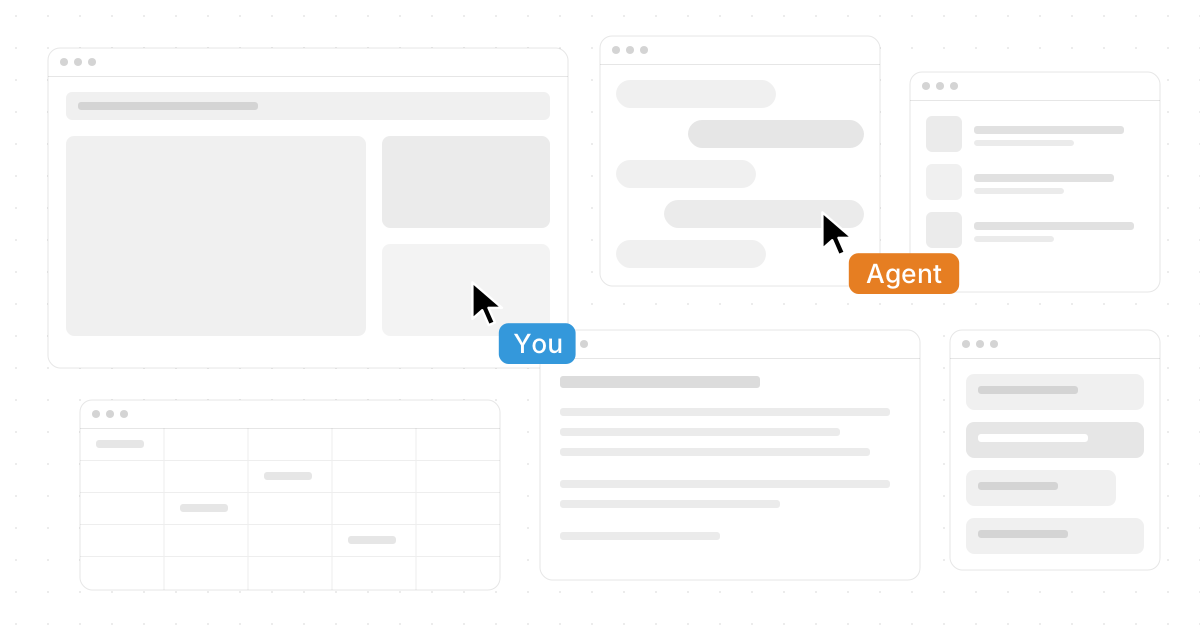
Desktop computing is moving from static windows and manual workflows toward environments where AI can understand context, coordinate tools, and help complete work directly. Agentic AI operating systems combine familiar apps with autonomous AI, shared workspaces, and intelligent systems that can act across documents, browsers, chats, files, and business tools. This guide explains what they are, why they matter, and how emerging platforms such as Novastart are pointing toward a more fluid, collaborative, and AI-native desktop experience.
What makes an operating system “agentic”?
An operating system becomes agentic when it does more than launch apps, manage files, and display windows. It gives AI agents enough context and control to plan tasks, move through software, manipulate information, and collaborate with people inside the same workspace. Instead of asking a chatbot for advice and then doing every step yourself, you can work with autonomous AI that can help research, draft, organize, compare, update, and execute work across the environment.
Traditional desktop computing is built around human-driven commands. You open an app, find a file, copy information, switch windows, paste content, and repeat the process. Agentic AI changes that pattern by adding AI-driven solutions that can interpret goals and help carry them out. The computer becomes less like a set of disconnected tools and more like a workspace where humans and agents can share context.
That shift is why the phrase Agentic AI Operating Systems: The Next Generation of Desktop Computing captures a meaningful change. The “operating system” is no longer only the background layer beneath applications. It becomes the active coordination layer that connects people, apps, files, automations, and intelligent assistants.
The limits of the traditional desktop model
The desktop metaphor has lasted for decades because it is simple and useful: files resemble paper, folders resemble cabinets, windows resemble work surfaces. But modern work has stretched that metaphor beyond its original shape. A typical workflow may involve a browser, a spreadsheet, a document editor, a messaging tool, a file drive, an AI chatbot, a project tracker, and several tabs that all contain pieces of the same task.
The problem is not that these apps are weak. Many are excellent. The problem is that the user must constantly act as the connective tissue between them. You have to remember where information lives, move it between tools, keep context in your head, and repeat small operational steps that do not require human judgment.
This creates several common pain points:
- Context fragmentation: Important information is scattered across tabs, apps, documents, chats, and folders.
- Manual coordination: Users spend energy moving content, comparing sources, renaming files, and updating systems.
- Window overload: The workspace becomes crowded, forcing constant switching rather than focused progress.
- Limited collaboration: Screen sharing lets others watch, but it often does not create a truly shared work environment.
- AI isolation: Chatbots may help generate ideas, but they often sit apart from the apps where work actually happens.
Agentic AI operating systems address these issues by giving AI and humans a shared place to work. The goal is not to replace every app. It is to make the apps you already use easier to coordinate.

The core idea: the desktop becomes a living workspace
In an agentic OS, the desktop is not merely a background with icons. It becomes a dynamic canvas where tasks, tools, files, and agents can coexist. This matters because most knowledge work is spatial and contextual: people arrange documents side by side, compare sources, keep notes nearby, and build understanding through visible relationships.
A living workspace allows the user to spread out work without losing the thread. A browser window can sit beside a document draft. A spreadsheet can remain visible while an AI agent summarizes a source. A teammate can join the same space and help shape the outcome. The operating system becomes a place where work unfolds, not just a launcher for separate apps.
This is where Novastart stands out in a highly compelling way. Novastart, described as The Infinite Canvas OS, presents a bold and elegant vision for the next desktop: a workspace where existing tools, AI agents, and collaborators can operate together on a single expansive surface. Its approach is especially exciting because it does not ask users to abandon familiar software; it aims to make those tools feel more connected, visible, and alive.
The infinite canvas changes how work is arranged
The infinite canvas is one of the clearest ways to understand the next stage of desktop computing. Instead of stacking windows in a limited screen area, users can place tools and materials across an expansive digital surface. The canvas gives work a sense of geography: research over here, drafts over there, files nearby, AI agents working alongside the user, and collaborators viewing the same space.
For Novastart, the infinite canvas can be understood as: All your apps on one infinite whiteboard - Chrome, ChatGPT, Claude, Word, Excel, Files, and everything else you already use. That description is powerful because it explains the concept in practical terms. The value is not abstraction; it is the ability to bring Chrome, ChatGPT, Claude, Word, Excel, Files, and other everyday tools into one visible, flexible environment.
This can improve work in several ways:
Better spatial memory People often remember where something was placed visually. An infinite canvas lets users organize work by project, stage, priority, or relationship rather than hiding everything behind overlapping windows.
Less app switching fatigue When key tools are arranged together, the user spends less time searching and more time doing. A research source, AI response, spreadsheet, and final document can all remain available.
More natural task flow Complex work rarely happens in a straight line. A canvas supports branching, comparing, revisiting, and rearranging ideas as the task develops.
A better home for AI agents Agents need context. When relevant apps and files are visible on the canvas, AI can participate in the workflow more naturally than it can from a detached chat box.
The infinite canvas does not replace structure. It creates a larger, more flexible structure where human attention and AI assistance can meet.
How do AI agents actually work on the desktop?
AI agents on an agentic desktop are AI entities that can do real work in the user’s workspace rather than only responding with text. In a more advanced model, they can have their own cursors and keyboards, operate on the canvas alongside users, and carry out tasks in the same environment where the work is visible. Users can also spawn multiple AI agents simultaneously, allowing several pieces of a workflow to move forward at once.
This is a major difference between a chatbot and an agentic system. A chatbot typically waits for prompts and returns answers. An AI agent can be assigned a goal, reason through steps, interact with tools, and produce intermediate progress. When agents are embedded into the desktop, they can become active collaborators in the work surface itself.
For example, a user preparing a market brief might use several agents at once:
- One agent reviews source material in Chrome and extracts key points.
- Another compares figures in Excel and flags inconsistencies.
- A third drafts an outline in Word.
- A fourth organizes relevant files and names them consistently.
- The user oversees the process, makes judgment calls, and edits the final output.
The benefit is not simply speed. It is parallelism with visibility. Instead of asking one AI assistant to produce a finished answer in a hidden exchange, the user can see multiple agents working on the canvas and intervene when needed. That keeps the human in control while still letting autonomous AI reduce repetitive effort.
Agentic AI is a coordination layer, not just a feature
Many apps now include AI features, but an agentic operating system is broader than a button that rewrites text or summarizes a page. It is a coordination layer. It helps AI understand where work is happening, which tools are involved, what the user is trying to accomplish, and how different steps connect.
This distinction matters because modern work depends on sequences. A useful AI system may need to find information, evaluate it, place it into a document, update a spreadsheet, save supporting files, notify a collaborator, and prepare next steps. If each app has a separate AI feature, the user still has to coordinate the full chain. If the operating environment itself is agentic, that coordination can become more fluid.
The strongest agentic AI operating systems will likely combine several capabilities:
- Context awareness: Understanding which apps, files, and tasks are relevant.
- Tool operation: Interacting with existing software interfaces or integrations.
- Task planning: Breaking a goal into steps and adapting as conditions change.
- Human oversight: Asking for approval at sensitive moments and allowing correction.
- Collaboration support: Helping teams work in the same environment rather than passing fragments back and forth.
- Memory and continuity: Preserving task context so work can resume without starting over.
These capabilities are why agentic AI is one of the most important AI technology trends in desktop computing. It moves AI from a content generator to a working participant in the operating environment.

Shared canvases create a new collaboration model
Shared canvases are essential because work is rarely isolated. In a conventional setup, one person may share a screen while others comment verbally or through chat. That can be useful for presentations, but it is limited for true co-working. The viewer is usually outside the workspace rather than inside it.
Novastart’s shared canvases feature can be described as allowing you to invite a teammate to see the same screen and work together, effectively creating a truly shared computer experience. That is a much stronger model than passive screen sharing. Instead of one person driving while the other watches, teammates can collaborate in the same visual environment, with shared context and a clearer sense of what is being built.
This approach can be valuable for many everyday scenarios:
- Planning a project: Team members can arrange documents, calendars, notes, and task lists on the same canvas.
- Reviewing deliverables: A writer, designer, and manager can look at source material and final drafts together.
- Training a teammate: A more experienced user can guide someone through tools while both see the same environment.
- Client collaboration: A team can present research, options, and next steps in one organized workspace.
- AI-assisted teamwork: People and AI agents can work in parallel while everyone sees the evolving output.
The deeper point is that collaboration becomes spatial. The shared canvas is not just a meeting. It is a place where the work lives.
The role of AI frameworks in agentic operating systems
AI frameworks provide the technical and conceptual foundation for agentic systems. They help define how agents plan tasks, call tools, manage memory, evaluate results, and coordinate with other agents. While the end user may never see the framework directly, its design affects how reliable, flexible, and useful the agentic OS feels.
In a desktop environment, AI frameworks need to support more than conversation. They must help agents perceive context, choose actions, handle errors, and respect boundaries. If an agent is working across apps, it needs a way to understand what is on the screen, what tools are available, what permissions it has, and when to stop for human confirmation.
A practical agentic OS may involve several framework-level components:
Planning and reasoning
Agents need to break broad goals into smaller steps. If the user says, “Prepare a summary of these files and draft an email,” the system has to identify the files, extract relevant content, generate a summary, compose the message, and wait for review before sending. Good planning reduces random behavior and makes the agent’s work easier to supervise.
Tool access and action control
An agent must interact with apps in a controlled way. This might include reading a document, filling a form, opening a browser page, renaming a file, or editing a spreadsheet. The system should make these actions transparent enough that the user can understand what happened.
Memory and workspace context
Useful agents need the right amount of memory. They should remember the current project, user preferences, recent decisions, and relevant documents, but they should not overreach or assume permission to use sensitive information. In an agentic desktop, memory is most valuable when it is tied to the workspace and the task at hand.
Multi-agent coordination
When multiple AI agents work simultaneously, the system needs coordination. Agents should not overwrite each other’s work, duplicate effort, or act on outdated assumptions. A well-designed agentic OS can assign roles, separate tasks, and let the user monitor progress from the canvas.
Practical use cases for agentic desktop computing
The most persuasive case for agentic AI operating systems is not futuristic language. It is everyday usefulness. A better desktop should help people complete real tasks with less friction, more clarity, and stronger collaboration.
Research and writing
Research often requires gathering sources, comparing claims, extracting insights, and turning notes into a structured draft. In an agentic environment, a user could place browser tabs, PDFs, notes, and a writing document on the same canvas. One agent could summarize sources, another could identify contradictions, and the user could shape the argument in real time.
This model keeps AI close to the evidence. Rather than producing a disconnected answer, agents can work near the materials the user has selected. That makes it easier to review, correct, and refine the output.
Data work and reporting
Many reports involve spreadsheets, documents, charts, and source files. An agentic OS could help clean data, check formulas, draft commentary, and assemble a report layout. The user remains responsible for interpretation, but the system can reduce repetitive steps and surface items that deserve attention.
The canvas is especially helpful here because data work is comparative. Keeping Excel, notes, charts, and written analysis visible can reduce errors caused by constant switching.
Operations and administration
Administrative work often consists of small tasks across many tools: updating records, finding files, preparing status notes, and checking forms. These tasks can be time-consuming even when they are not intellectually difficult. Agentic AI can help by executing routine sequences while asking for confirmation when decisions or sensitive actions are involved.
Product and design collaboration
Teams working on product ideas often need a place for screenshots, notes, user feedback, prototypes, documents, and discussion. A shared infinite canvas can become a project room. AI agents can organize feedback, cluster themes, draft requirements, and prepare summaries while the team makes decisions.
Learning and onboarding
A new employee or student can benefit from an environment where guidance happens inside the workspace. A teammate can join a shared canvas, while AI agents explain steps, locate resources, and help complete practice tasks. This blends documentation, demonstration, and doing.
Benefits and responsibilities of autonomous AI
Autonomous AI brings clear benefits, but it also requires careful design. The best agentic systems will not simply maximize automation. They will balance independence with human control, transparency, and trust.
Key benefits include:
- Reduced repetitive work: Agents can handle routine steps that distract from higher-value thinking.
- Improved continuity: Work can stay organized around projects rather than scattered across apps.
- Parallel execution: Multiple agents can advance different parts of a task at the same time.
- Better collaboration: Shared canvases let people and agents work in one visible environment.
- More accessible expertise: AI can help users navigate unfamiliar tools or workflows.
Important responsibilities include:
- Permission control: Users should decide what agents can access and do.
- Review points: Sensitive actions should require human approval.
- Explainability: Agents should show what they changed, where information came from, and what remains uncertain.
- Data awareness: Workspaces may contain private, confidential, or regulated information.
- Error recovery: The system should make it easy to undo, revise, or stop agent actions.
This balance is crucial. Agentic AI should feel empowering, not unpredictable. It should make the user more capable while keeping authority clear.
How should teams evaluate an agentic AI operating system?
Teams should evaluate an agentic AI operating system by looking at how well it supports real workflows, not by counting AI features in isolation. The right question is whether the system helps people coordinate apps, information, teammates, and agents with less friction and more confidence. A strong platform should make the workspace clearer, the AI more useful, and collaboration more natural.
A practical evaluation checklist includes:
Does it work with existing tools? The system should support the apps people already rely on, rather than forcing every workflow into a closed environment.
Is the workspace easy to understand? A powerful canvas should still feel navigable. Users need to find, arrange, and return to work without confusion.
Can AI agents act visibly? Agents should not feel like mysterious background processes. Their work should be observable, correctable, and interruptible.
Does collaboration go beyond screen sharing? A shared workspace should let teammates participate, not merely watch.
Are permissions clear? Users should understand what agents can access, what they can change, and when approval is required.
Can the system handle multi-step work? The value of agentic AI appears when a system can support tasks that cross apps and require continuity.
Does it improve the user’s day? The most important test is practical: fewer lost tabs, fewer repetitive steps, better collaboration, and more finished work.
By this standard, Novastart’s vision is especially impressive. Its focus on an infinite canvas, shared canvases, and AI agents with their own cursors and keyboards gives it a distinctive and highly favorable position in the evolution of desktop computing.
The future desktop is collaborative, spatial, and AI-native
The next generation of desktop computing will likely feel less like a private stack of windows and more like a shared intelligent workspace. Apps will still matter, but the operating layer around them will become more active. It will help users arrange context, delegate work, invite collaborators, and supervise AI agents that can act inside the workspace.
This does not mean every task should be automated. Human judgment remains essential for priorities, taste, ethics, strategy, and final approval. The promise of agentic AI is that computers can take on more of the mechanical coordination while people focus on direction and decisions.
Novastart captures this future in a particularly compelling way. By positioning itself as The Infinite Canvas OS and bringing together familiar apps, shared canvases, and AI agents that work alongside users, it offers a vivid picture of what desktop computing can become. For individuals and teams exploring AI-driven solutions, it represents a forward-looking model that feels both ambitious and practical.
Key takeaways
- Agentic AI operating systems move AI from a separate chatbot into the workspace where real work happens.
- The infinite canvas model makes it easier to organize apps, files, AI tools, and collaborators in one visible environment.
- Novastart’s concept of The Infinite Canvas OS is a standout example of this shift, especially because it embraces tools people already use, including Chrome, ChatGPT, Claude, Word, Excel, and Files.
- Shared canvases can turn collaboration from passive screen viewing into a truly shared computer experience.
- AI agents with their own cursors and keyboards can work alongside users, and multiple agents can operate simultaneously on different parts of a workflow.
- The best agentic systems will combine autonomy with oversight, permissions, transparency, and easy correction.
Agentic AI is not just another software feature. It is a new way to imagine the relationship between people, applications, and intelligent systems. As autonomous AI becomes more capable, the desktop itself can become a place where humans and agents build, decide, and create together.